
Thank you for taking part in the PIENTER 4 survey. Your participation is going to make an important contribution to the health of the Dutch population. Below is information on the self-collection of bodily material for the study. You will also find answers to frequently asked questions. Below are answers to frequently asked questions. If you have any other questions, please contact the RIVM study team. Staff members are available Monday to Friday from 09:00 to 15:00 via 088 689 7304 or via pienteronderzoek@rivm.nl.
Video Finger-prick sampling
Instruction video Finger-prick sampling (in Dutch)
In deze video wordt uitgelegd hoe de vingerprik gebruikt moet worden.
Voice-over: We vragen u een paar druppels bloed te verzamelen in een buisje. Dit doet u door een prikje in de vinger. U kunt het zelf doen, of samen met iemand anders als u dat fijn vindt. We leggen u stap voor stap uit hoe u de bloedafname moet uitvoeren. Doorloop alle stappen.
Was uw handen met warm water en zeep. Droog uw handen met een schone handdoek. Vul een glas met warm water. Maak de vinger waarin u gaat prikken schoon met het alcoholdoekje. Houd het glas minimaal 2 minuten vast met de hand waarin u gaat prikken. Zo wordt de doorbloeding van uw hand bevorderd. Laat nu uw hand 1 minuut naar beneden hangen om de doorbloeding nog meer te bevorderen. Masseer de vinger waarin u wilt gaan prikken. De ring- en middelvinger zijn het minst gevoelig. Masseer de vingers door 20 seconden van palm naar vingertop te wrijven. Pak het minibuisje en haal de dop eraf. Leg de dop omgekeerd naast het buisje. Verwijder het kapje van de vingerprikker door deze draaiend omhoog te trekken. Let op: de vingerprikker kan maar één keer worden gebruikt. Raak de punt niet aan. Dit activeert het prikmechanisme. Leg de vinger waarin wordt geprikt op tafel. Prik in een van de zijkanten van het topje van de vinger. De zijkanten zijn het minst gevoelig. U kunt ook vragen of iemand anders u prikt. Duw de vingerprikker stevig tegen de vinger aan. U voelt nu een prikje. Houd de hand met de vingers naar beneden boven het buisje. Masseer uw vinger van palm naar vingertop totdat er een druppel bloed gevormd is. Schraap de druppel zo nodig langs de bovenkant van het minibuisje af. Probeer het buisje zo goed mogelijk te vullen. Minimaal 10 tot 20 druppels en maximaal tot de bovenste dikke streep.
Heeft u niet voldoende bloed kunnen verzamelen? Prik dan met een nieuwe prikker in uw andere vinger. Maak eventueel uw vinger schoon met het gaasje. Plak een pleister op het wondje. Druk de dop stevig op het minibuisje. Verpak en verzend het buisje volgens de instructies die u heeft gekregen.
Beeldtekst: Dit is een uitgave van het RIVM.
Logo Rijksoverheid. Ministerie van Volksgezondheid, Welzijn en Sport. Rijksinstituut voor Volksgezondheid en Milieu.
Beeldtekst: De zorg voor morgen begint vandaag.
Instruction Flyer Finger-prick blood sampling
Frequently asked questions about the finger-prick
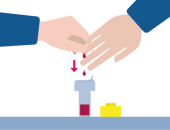
How much blood needs to go in the tube?
Try to fill up the tube as much as possible. Try to collect no fewer than 10 to 20 drops of blood in the tube.
I cannot get any blood out from my finger. Any tips?
- Improve the blood flow: Before pricking your finger, try to hold your hand in warm water for a few minutes (or hold a glass of hot water) or wave your arms or walk up and down the stairs, for example. Next, you can massage the finger. This will improve the blood flow in your fingers and help you to get (enough) blood out of your finger.
- How to use the finger-prick: The best site is the middle or ring finger on the hand you do not use for writing. Prick the side of the top of the finger for good blood flow. After you have pricked your finger, press just next to the prick site to start the flow of blood drops. Point the finger you pricked downwards. It may take a while for a drop of blood to emerge, this is normal. The flyer and the video on this page contain these and other instructions.
Video Sampling nasal fluid
Instructional video sampling nasal fluid (in Dutch)
In deze video wordt uitgelegd hoe de neusvochtafname werkt.
Voice-over: U gaat neusvocht afnemen voor het RIVM. We vragen u neusvocht te verzamelen met een flexibel stripje. Het stripje gaat een paar centimeter de neus in. We leggen u stap voor stap uit hoe u dit moet doen. Doorloop alle stappen.
Snuit uw neus en was uw handen met water en zeep.
Droog uw handen met een schone handdoek.
Neem het neusstripje uit de buis door aan het witte uiteinde van de buis te draaien, tegen de klok in.
Houd het stripje vast aan het zeshoekige plastic uiteinde. Raak de platte strip die in de neus gaat niet aan.
Breng het stripje voorzichtig in een neusgat tot de ronde verdikking bij het zeshoekige handvat. U hoeft de afname maar in één neusgat te doen.
Heeft u twee stripjes gekregen? Neem het andere stripje dan af in het andere neusgat.
Druk het neusgat waar het stripje in zit dicht door op de zijkant van het neusgat te drukken. Houd deze 1 minuut dicht.
Probeer bij kleine kinderen het neusgat in ieder geval 30 seconden dicht te drukken of zo lang als mogelijk is. Maximaal 1 minuut.
Haal het stripje voorzichtig uit de neus en plaats deze terug in het buisje.
Sluit de buis door deze aan het witte uiteinde van het stripje dicht te draaien, met de klok mee.
Verpak en verzend het buisje volgens de instructies die u heeft gekregen.
Beeldtekst: Dit is een uitgave van het RIVM.
Logo Rijksoverheid. Ministerie van Volksgezondheid, Welzijn en Sport. Rijksinstituut voor Volksgezondheid en Milieu.
Beeldtekst: De zorg voor morgen begint vandaag.
Instruction Flyer sampling nasal fluid
Frequently asked questions about the sampling of nasal fluid:
I cannot keep the strip in my nose for 1 minute. What should I do?
Try to hold the strip in your nose as long as possible, at least more than 30 seconds. If you received 1 strip, you can also try to switch to the other nostril. If you received 2 strips, you must use a separate strip for each nostril.
Instruction Flyer stool collection
Frequently asked questions about stool collection:
How many days in advance can I collect my stool sample?
Collect the stool sample preferably on the day of the home visit or the day before. If that is not possible, you can do it some days earlier. It is important that you store the stool sample in the refrigerator until the home visit.
I did not manage to take a stool sample before the home visit. What should I do?
You can inform the home visit assistant that it was not possible to collect a stool sample. The home visit assistant will explain how you can send your stool sample to RIVM via regular mail if necessary at a later date.
Instruction Flyer urine collection
Frequently asked questions about urine collection
I forgot to collect my urine sample in the morning. What should I do?
You can inform the home visit assistant that you did not manage to collect a urine sample. The home visit can still take place. You do not have to cancel the appointment.
I no longer want to participate in the study. How do I cancel my registration?
You can stop participating at any time. If you wish to cancel your participation, please contact the study team. This can be done via:
- telephone number 088 689 7304 (Monday through Friday 09:00-15:00)
- email to pienteronderzoek@rivm.nl.
I did not get an invitation. Can I still participate?
Unfortunately, you cannot participate without an invitation. You must be invited to participate in the study.
I want to cancel or reschedule my home visit. How do I do that?
To cancel or reschedule a home visit, please contact telephone number mentioned in the confirmation of your appointment.
We kindly ask that you contact us at least 24 hours in advance to cancel or reschedule your appointment.
I moved house. Do I need to inform the PIENTER 4 study?
It is important that you provide us with your new address. We will then change your address details in our participant file so that our mail is sent to the correct address. You can submit your address change for the PIENTER 4 study at pienteronderzoek@rivm.nl.
I have a new email address or phone number. Do I need to inform the PIENTER 4 study?
Yes, it is important that we have the correct e-mail address or telephone number so that we can contact you about any questions. And so that you can log in and fill out the online questionnaires. Please inform us of your new email address or telephone number at pienteronderzoek@rivm.nl.
What about my privacy when I participate in the study?
The use of personal data is regulated by law under the General Data Protection Regulation (GDPR). The PIENTER 4 study complies with all GDPR guidelines. The participant information you have received describes in detail how we handle your data and bodily material. For more information, please also refer to RIVM's Privacy statement on research involving human subjects.
What happens to my bodily material?
The bodily material that has been taken from you is used for various studies on the protection against infectious diseases and the impact of living environment and lifestyle on health. Not all of the studies are performed straight away. Therefore, we store the bodily material in the freezer at RIVM or at an external storage location. We store the bodily material for up to 50 years.
How can I look up my vaccination data?
You can look up your vaccination data in your vaccination booklet ("the yellow vaccination booklet"). You can log in to MijnRIVM on the RIVM website using your DigiD to view vaccination data, such as the coronavirus vaccinations or vaccinations you have received through the National Immunisation Programme. If you were born before 1992, you can request an overview of your vaccinations via the link on MijnRIVM. It may take up to 4 weeks for you to receive this information.
I have not yet received a login code. What should I do?
After you have digitally signed up for the study, you will automatically receive an email with your personal login link for the PIENTER 4 study portal. This personal link can only be used once. Then enter your password. You will receive a text message (SMS) with your verification code. As soon as you enter this, you are logged in. If you did not receive this email and you cannot find it in your SPAM folder, or if you did not receive the text message with the verification code, please contact us at pienteronderzoek@rivm.nl.
I forgot my password. What should I do?
If you have forgotten your password, you can request a new password in the portal by clicking the ‘Wachtwoord vergeten?’ button (‘Forgotten your password?’). You will then receive an email with a link at the email address we have for you. This personal link can only be used once. If you are using a new email address and/or mobile number and have not yet provided this to us, please contact us at pienteronderzoek@rivm.nl.
I change my password, but then the screen freezes. What should I do?
This can happen if you are using a password manager. First, close the web page. You can disable the password manager from the settings in your browser. You can then use the link in the email to go to the portal and fill in your password. Or you can use an incognito window or privacy mode in your browser. You can also use another Internet browser (Google Chrome, Safari, etc.).
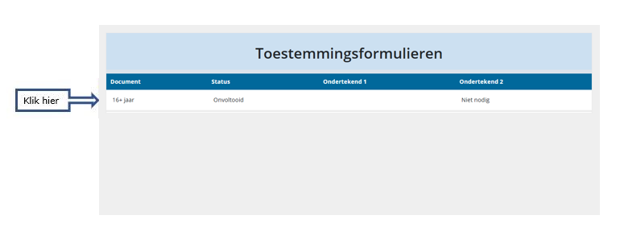
Where can I find the consent form that I need to fill out?
After you save the new password, you will be taken to the start screen of your personal page in the portal. Until you have signed a consent form, you can only access the consent form. You will be automatically directed to the consent form even if you click on something else.
Why do I see 2 consent forms?
You will only see 2 consent forms if you are the parent of a child aged 12 to 15 years. At that age, not only do the parents sign but the child also has to sign.
Where do I see the signed consent form?
After signing the consent form, you can download and save the consent form as a PDF document. You can find the consent form later by clicking on the 'Toestemming’ (‘Consent’) selection menu on the left side of the screen. This is the location of the signed consent form. During the PIENTER 4 study, you can download and save this PDF.
My child is 16 years old; who signs the consent form?
Persons aged 16 years and older register for the PIENTER 4 study and sign the consent form themselves.
My child turns 12 years old during the PIENTER 4 study, what happens then?
If your child turns 12 during the study, we will send you and your child an email explaining how your child can also give consent to the study. If your child wishes to continue to participate, they will fill in the consent form. If your child no longer wishes to participate, you can notify PIENTER-onderzoek@rivm.nl by email.
My child turns 16 years old during the PIENTER 4 study, what happens then?
If your child turns 16 during the study, we will send you and your child an email We will explain that the contact details of the parents will be deleted within 14 days, and all emails will go to your child from then on. Your child can decide whether their parents/care providers can still receive emails and keep access to the study. Your child can indicate this by sending us an email. If your child does not indicate anything, we cannot contact the parents any longer.
Where can I find the questionnaires that I have to fill out?
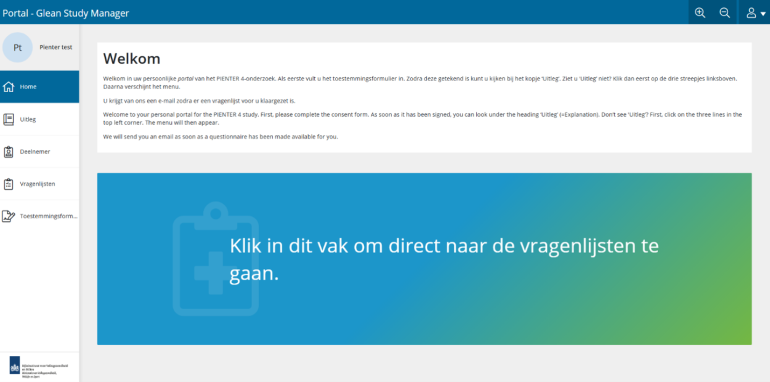
After you log in, you will be taken to the start screen of your personal page in the portal. From the start screen, there are several ways to access the questionnaire:
- 1. On the portal start screen, you will see a blue and green box with the text: “Klik in dit vak om direct naar de vragenlijst te gaan.” (“Click in this box to go directly to the questionnaire.”) Click anywhere in this box and you will be taken directly to your questionnaire.
- 2. There is a pull-down menu on the left side of the screen. Click on the last option (“Vragenlijsten”, “Questionnaires”) in this drop-down menu.
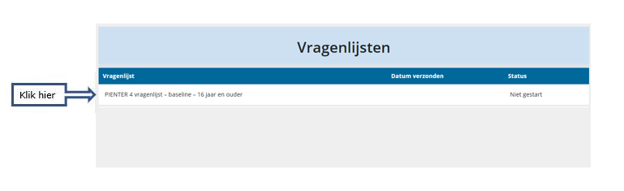
- This will take you to the screen below. This screen shows you the available questionnaire (appropriate to your age group) and the status of the questionnaire. Click on the questionnaire to open it.
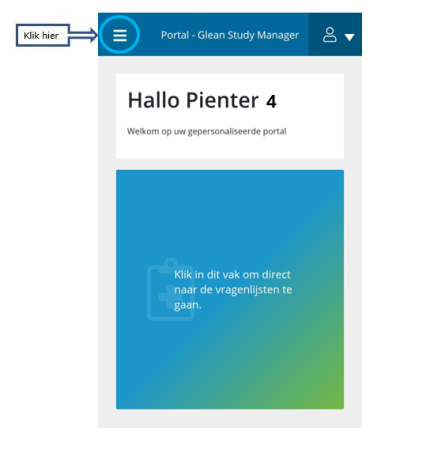
If you do not see a drop-down menu on the left side of the screen, expand the window of your web page, or click the three white dashes in the upper left corner of the screen to display the drop-down menu:
I will be on holiday or I am unavailable for a week or two. Is my participation still useful?
Yes, it certainly is! You will still be able to participate. However, we would ask you to take a sample of your bodily materials and complete the questionnaire or schedule a home visit as soon as you are able to do so.